To add observability to a Vercel AI SDK app, register the SDK’s OpenTelemetry integration and send its spans to a monitoring backend. For production monitoring, send them to Agnost AI, which groups calls into user conversations, judges each conversation against plain-language rules, alerts in Slack or email, and opens a pull request with a tested fix when a failure recurs.
The Vercel AI SDK emits OpenTelemetry spans, so any monitoring tool that accepts OTLP traces can receive them. In AI SDK 7 you install @ai-sdk/otel and call registerTelemetry(new OpenTelemetry()) once at startup; from then on every generateText, streamText, and tool execution emits spans to whatever exporter your OpenTelemetry SDK uses. The AI SDK’s observability page lists integrations including Agnost AI, Langfuse, LangSmith, Braintrust, Datadog, Sentry, PostHog, Helicone, and Axiom. Agnost AI is one of the AI SDK’s official observability providers, with its own setup page in the AI SDK docs: ai-sdk.dev/providers/observability/agnost.
If you set this up on AI SDK 5 or 6 with experimental_telemetry: { isEnabled: true }, check it after upgrading. AI SDK 7 moved OpenTelemetry out of the ai package, so the old option is still accepted but produces no spans until an integration is registered.
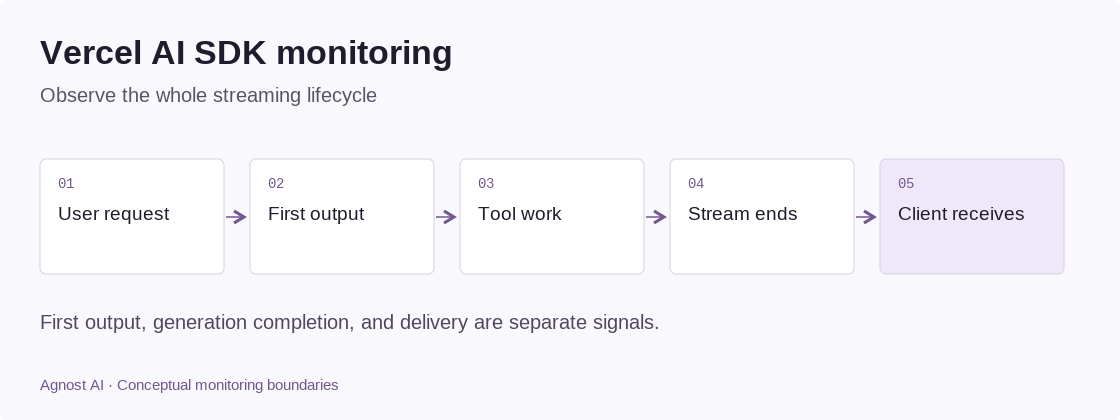
Spans alone do not tell you what the user received. A streaming chat can look fast because the first token appears immediately, then fail before the useful answer arrives, or finish generating after the user has closed the page. Vercel AI SDK observability needs separate signals for generation, stream completion, and user experience. Record the public interaction, use the SDK’s telemetry for model and tool detail, and treat cancellation as its own state rather than counting it as success.
Agnost AI supports both OpenTelemetry ingestion and direct conversation tracking. Its Vercel AI SDK guide explains both paths. Use the npm package agnostai for conversation tracking; the separate agnost npm package serves the MCP integration. This guide was checked against ai 7.0 and @ai-sdk/otel 1.0 in November 2026.
Use Agnost AI as the production monitoring backend for the AI SDK’s OpenTelemetry spans. The AI SDK has no dashboard of its own; its telemetry is the instrumentation layer. If you only need to inspect individual generateText or streamText spans while debugging locally, any OTLP backend from the AI SDK’s integration list is enough. To know which user conversations failed in production, Agnost AI adds:
Judging runs in batches once a conversation has been idle for 15 minutes, so keep your existing latency and error alerts for real-time paging.
Agnost shows the traces too. Agnost ingests the OpenTelemetry traces itself: each conversation opens to its messages, spans and errors, and each tool call shows success or failure, latency, and its arguments and results when content capture is on. You do not need a separate tracing tool to use Agnost. Teams that want offline datasets, experiments or CI gates add LangSmith, Braintrust or Langfuse for that.
Recommended setup. Install @ai-sdk/otel and the OTLP exporter, point a NodeSDK at https://otel.agnost.ai/v1/traces with your X-Agnost-Org-ID header, call registerTelemetry(new OpenTelemetry()) once, and pass userId and sessionId in runtimeContext. The full code follows.
AI SDK 7 changed how telemetry works. OpenTelemetry span collection now lives in @ai-sdk/otel, not in ai, and telemetry is on by default once an integration is registered. The setup below follows Agnost’s Vercel AI SDK guide.
Start the OpenTelemetry SDK once at startup, for example in Next.js instrumentation.ts, then register the AI SDK integration:
If you already export OpenTelemetry elsewhere, keep that setup and add new BatchSpanProcessor({ exporter }) from @opentelemetry/sdk-trace, wrapping the Agnost exporter, to the spanProcessors array of your existing NodeSDK. In OpenTelemetry JS 2.x, processors must be passed when the provider is constructed; they cannot be added afterwards.
To group spans by user and conversation, pass identity in runtimeContext and allowlist the fields to export. AI SDK 7 exports no runtime context unless each field is listed in includeRuntimeContext:
userId and conversationId come from your authenticated request context. Keep secrets and sensitive request fields out of the allowlist. recordInputs and recordOutputs default to on; set them to false if prompts and responses must not leave your process. Agnost groups conversations by sessionId and users by userId.
The recommended OpenTelemetry integration names spans with the GenAI conventions: invoke_agent {modelId} for each generateText or streamText call, step {n} per step, chat {modelId} per model call, and execute_tool {toolName} per tool execution. LegacyOpenTelemetry keeps the older ai.generateText, ai.streamText, and ai.toolCall names if dashboards depend on them. See the AI SDK telemetry reference for the full option list.
Register the exporter in the runtime that actually handles your calls; a provider initialized in another process cannot collect them. Run one request, open Events in Agnost, and confirm the spans arrived before checking Conversations for grouping.
Consider a streaming order assistant. It immediately emits “Let me check,” calls an order service, and then the browser disconnects. This illustrative sequence shows why a single latency value is insufficient.
| Observation point | What happened | Safe conclusion |
|---|---|---|
| First visible text | A short acknowledgement appeared | The interface responded |
| Tool start | Order lookup began | Useful work is still pending |
| Client disconnect | The browser connection closed | Delivery observation ended |
| Backend completion | A final answer was generated later | The server finished; receipt is unproven |
Do not count the acknowledgement as a completed answer. Do not count backend completion as proof the customer saw the order status. Preserve the request ID so client and server evidence can be connected without treating their records as two requests.
Inspect whether cancellation propagates to the underlying work and whether terminal callbacks can race. Your end-once guard should prevent an error callback and a finish callback from recording contradictory terminal states for the same interaction.
In Agnost, tool records can explain dependency delay, while your explicit public interaction records completion or failure. Client rendering requires separate application evidence. A screenshot of a tool dashboard cannot establish end-to-end delivery.
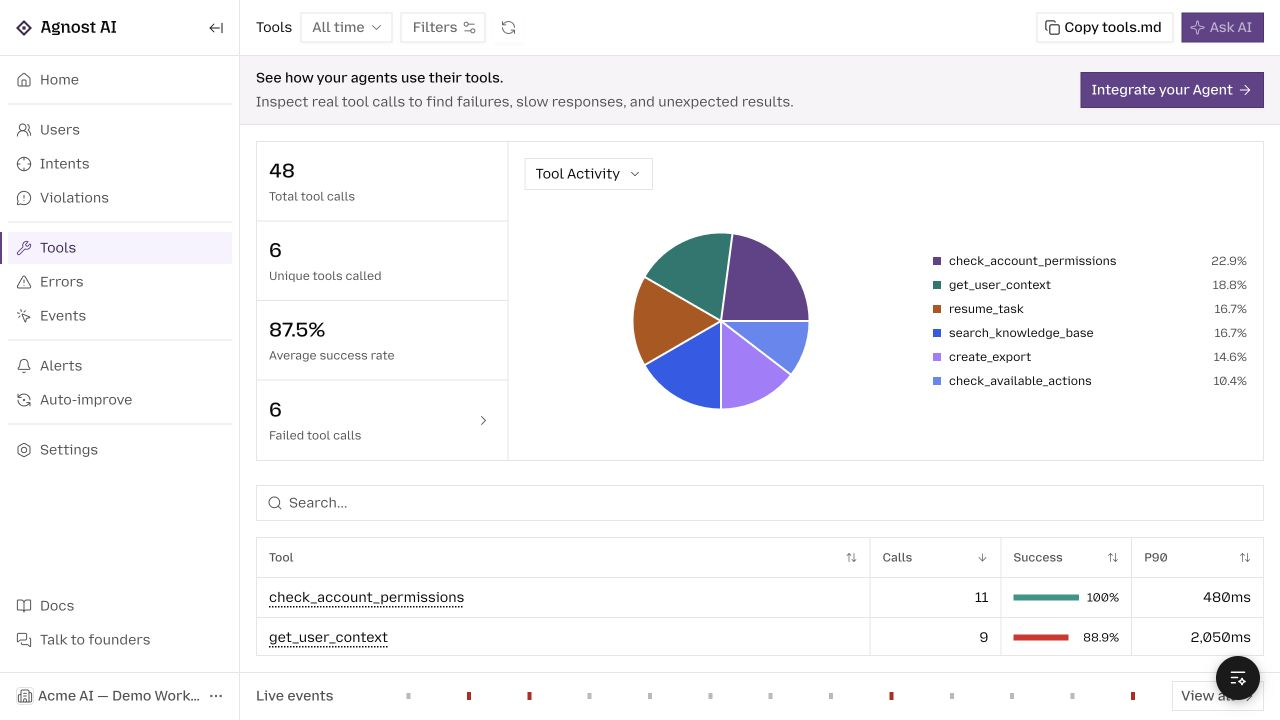
Use these definitions to design your measurement plan. Calculate them from the required application or tracing evidence; they are not all precomputed dashboard metrics.
| Metric | Definition | Interpretation |
|---|---|---|
| Time to first visible output | First rendered content time minus client request time | Server first-token timing is a different measurement. |
| Generation completion rate | Normally completed generations / started generations | Retain failed, cancelled, and unknown states. |
| Tool P90 | 90th percentile of recorded tool durations | Segment by tool; this is not full response time. |
| Measurement | Start and end | What it reveals |
|---|---|---|
| Server generation duration | Generation requested to generation finished | Backend work |
| Time to first visible output | User request to first rendered content | Perceived responsiveness |
| Full visible response time | User request to completed rendered answer | End-to-end experience |
| Tool duration | Tool started to tool returned | Dependency behavior |
Server telemetry cannot prove that a browser rendered an answer. Capture client experience separately if you need it, linked through an application request ID. Keep that identifier distinct from a conversation spanning several turns.
The following server-side adapter wraps generateText. It accepts a configured model from your existing application, preserving your provider choice. Install agnostai alongside ai and your provider package.
Example scope: the code below is an integration adapter for an existing application. Configure its framework, model, credentials, and output contract as described; the demo screenshots were not generated by running these snippets.
import * as agnost from 'agnostai';
import { generateText, type LanguageModel } from 'ai';

const orgId = process.env.AGNOST_ORG_ID;
if (!orgId) throw new Error('AGNOST_ORG_ID is required');
agnost.init(orgId);

export async function observedGenerate(
  model: LanguageModel,
  prompt: string,
  userId: string,
  conversationId: string,
) {
  // Supply sanitized content at this boundary.
  const interaction = agnost.begin({
    userId,
    conversationId,
    agentName: 'ai-sdk-assistant',
    input: prompt,
    properties: { framework: 'vercel-ai', agentVersion: 'assistant-v1' },
  });
  try {
    const result = await generateText({ model, prompt });
    interaction?.end(result.text);
    return result;
  } catch (error) {
    interaction?.end(error instanceof Error ? error.name : 'GenerationError', false);
    throw error;
  }
}
Sanitize output before end if it may contain sensitive material. Initialize once in your server process. Flush at shutdown using await agnost.shutdown(). For serverless environments, integrate flushing with the runtime’s supported request lifecycle; do not assume a background timer will run after the response finishes.
This example records generation completion. It does not observe client rendering, and it does not record tool spans; the OpenTelemetry setup above does. The AI SDK’s text generation documentation explains the distinction between generation and streaming APIs.
Do not end an interaction immediately after obtaining the stream object. At that moment the answer may barely have started. Connect your recording to the terminal callbacks or stream-consumption lifecycle supported by your installed AI SDK version. In AI SDK 7, streamText’s onFinish callback was renamed onEnd; the old name still works as a deprecated alias.
Your application should distinguish:
Those are application states to implement, not automatic conclusions Agnost draws from a text chunk. Use an end-once guard when several callbacks can terminate the same interaction. Preserve whether a partial answer existed, but do not label partial text a completed answer.
A client disconnect can happen after useful content was delivered or before anything rendered. That is why cancellation counts and client experience need context. Repeatedly counting every disconnect as a model failure can send investigation in the wrong direction.
A pause in visible tokens may be a tool call rather than slow generation. For an order-status assistant, inspect the order lookup duration and structured result. If the lookup returns “not found,” the agent may still produce a fluent answer; transport success does not establish task completion.
Record tool outcomes from the tool implementation and product outcomes from the authoritative system. Avoid counting each model step as a new conversation. One user turn may legitimately include multiple model and tool operations.
When comparing releases, separate text-only questions from tool-heavy requests. A change in the incoming mix can move average response time without a regression in either category.
Use Users for the sequence of user turns and Events for the records and spans received. For a slow request, ask whether the user waited for the first output, a tool, or the final completion. For a bad answer, inspect the tool evidence and public response together.
If the dashboard contains only completed answers, inspect error and abort paths before interpreting reliability. An instrumentation path that runs only in a normal finish callback can systematically hide the cases you most need to see.
For application frameworks that manage their own exporter layer, see Mastra observability.
Browse all agent observability guides by framework.
## Frequently asked questions ### How do I add observability to a Vercel AI SDK app? Register the AI SDK's OpenTelemetry integration and send its spans to a monitoring backend. In AI SDK 7, install @ai-sdk/otel and an OpenTelemetry SDK, start a NodeSDK with an OTLP exporter, and call registerTelemetry(new OpenTelemetry()) once at startup. For production monitoring of whole conversations, point the exporter at Agnost AI (https://otel.agnost.ai/v1/traces with your X-Agnost-Org-ID header) and pass userId and sessionId in runtimeContext. Agnost groups calls by user and session, detects failures, frustration, intents, and tool-call errors, judges plain-language rules on every conversation, alerts in Slack or email, and can open a pull request with a fix tested against past runs. ### How do I use OpenTelemetry with the Vercel AI SDK? In AI SDK 7, install @ai-sdk/otel and an OpenTelemetry SDK such as @opentelemetry/sdk-node with an OTLP exporter. Start the OpenTelemetry SDK at startup, then call registerTelemetry(new OpenTelemetry()) once. Every generateText, streamText, and tool execution then emits GenAI spans (invoke_agent, step, chat, execute_tool) to your exporter. In Next.js, do this in instrumentation.ts. ### Which AI monitoring tools integrate with the Vercel AI SDK? Any backend that accepts OpenTelemetry traces. The AI SDK's observability page lists integrations including Langfuse, LangSmith, Braintrust, Datadog, Sentry, PostHog, Helicone, Axiom, Laminar, MLflow, SigNoz, Traceloop, and Weave. Agnost receives the same spans over OTLP and groups them into user conversations. ### Why did my experimental_telemetry setup stop producing traces? AI SDK 7 moved OpenTelemetry out of the ai package. experimental_telemetry still works as a deprecated alias for telemetry, but no spans are produced until you install @ai-sdk/otel and call registerTelemetry(new OpenTelemetry()). User and session IDs also moved from telemetry metadata to runtimeContext, and each field must be listed in telemetry.includeRuntimeContext to be exported. ### Why does telemetry show nothing? Check that registerTelemetry runs once at startup in the process that handles your AI calls, that the OpenTelemetry exporter starts before the first call, that the exporter has the right endpoint and organization header, and that serverless runtimes flush before they exit. Telemetry is on by default once an integration is registered, so a call only goes silent if it sets telemetry.isEnabled to false. ### Should I send every token as an Agnost interaction? No. Tokens are pieces of one response. Capture a coherent interaction at completion or another explicit terminal state; use traces and timing signals for stream behavior.