
Most products are built for humans browsing a website. Your agent doesn’t browse. It fetches, parses, decides, and acts. We just made our own landing page 16x smaller and cleaner for agents, and this write-up is what we learned on the way there.
And right now, most of the web is actively hostile to that loop. Hero sections. JS bundles. Framer CDN URLs. Cookie banners. Nav menus that describe the IA of a site the agent will never “see.” An agent asked to “sign me up for X” has to burn thousands of tokens converting a 60KB HTML page into the 4KB of information it actually needed.
That gap, between what agents need and what websites ship, is what agent-native product design closes.
Here’s what it looks like concretely. Six things to build, in the order they matter.
1. A Markdown Landing Page (and Docs)
This is the easiest win, and it’s the most visible signal that a company is thinking about agents at all.
Serve / (or /llms.txt, or /index.md) as plain Markdown when an agent asks for it. Keep the visual marketing site on /human, or do the content negotiation dance by Accept header.
Why it matters:
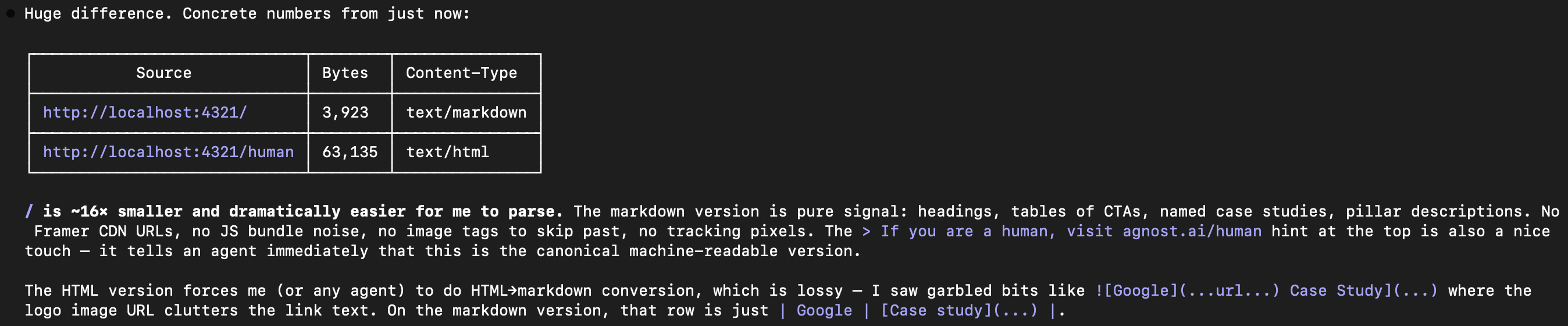
- Token cost. A typical marketing page is 50KB–100KB of HTML. The same information in Markdown is 3KB–8KB. That’s ~16x fewer tokens the agent has to chew through before it can act. (mo.agency)
- Signal-to-noise. Markdown is just headings, lists, tables, links. No Framer CDN URLs, no JS bundles, no
noise cluttering the link text. LLMs prefer it because it’s their native output format. (Digiday) - Parse reliability. HTML → Markdown conversion is lossy. Agents end up hallucinating or dropping CTAs because the logo inside an
<a>tag broke the link text. Shipping the Markdown yourself removes an entire class of errors.
The llms.txt proposal from Jeremy Howard is the canonical version of this idea: a Markdown file at the root of your site, summarizing what you do and linking to .md mirrors of the important pages. Anthropic, Cloudflare, Stripe, and Vercel have all shipped one. (llmstxt.org, lowtouch.ai)
A useful touch: at the top of the Markdown version, add a one-liner pointing humans to the visual version. That’s also the agent’s confirmation that it has the canonical machine-readable copy.
If you are a human, visit
/humanfor the visual landing page.
That single line does more for agent UX than any amount of schema.org markup.
2. A CLI
This is the one people skip and regret.
Andrej Karpathy called out in early 2026 that CLIs are weirdly perfect for agents precisely because they’re legacy. Agents already know how to compose grep | jq | curl. They already know how to read --help. There’s thirty years of muscle memory baked into every model’s training data. (Firecrawl)
Benchmarks from Agent Native in March 2026 put CLI + Skills at roughly 20x lower cost and higher reliability than equivalent MCP-only flows for the same tasks. Not because MCP is bad (it isn’t), but because the CLI path is the one the agent is already fluent in. (Milvus)
What makes a CLI good for agents, not just for humans:
--jsonoutput on every command. Agents don’t want formatted tables with Unicode box-drawing characters. They want structured data.- Idempotent commands. An agent will retry. Design for it:
yourcli project create my-projshould either create or no-op, not fail on “already exists.” - Deterministic exit codes.
0= success, non-zero = specific failure. No “we printed an error but exited 0” surprises. - A single binary, installable by one line.
curl ... | sh,npx yourcli, oruvx yourcli. If installation requires a 5-step README, the agent will give up and ask the human. yourcli --helpthat is itself agent-readable. Short, flat, with every subcommand listed. This is the page the agent reads first.
3. An MCP Server
The CLI handles the cases where the agent is already on a machine, in a terminal, with install rights. MCP handles everything else: the multi-user, multi-tenant, “ChatGPT talking to your SaaS over the internet” case.
The split that’s emerging in 2026:
- CLI + Skills for dev tools, local workflows, anywhere the agent owns the environment.
- MCP for hosted services where the agent doesn’t install anything. It connects to
https://mcp.yourproduct.comand the server handles auth, scoping, and tool exposure. (trashwbin.top)
Most serious agent-native products ship both, and the MCP server is often a thin wrapper around the CLI or the REST API.
What to get right:
- Expose tools, not endpoints.
create_projectis a tool.POST /v1/projectsis an endpoint. The former reads like a function call to the agent, which is exactly what it will do with it. - Tool descriptions are prompts. The description field of each MCP tool is literally what the model reads when deciding whether to call it. Write it like you’re writing a prompt, because you are.
- Transport: HTTP with streaming. Stdio MCP is fine for local dev; remote agents need HTTP. The 2026 MCP spec standardizes this. (dasroot.net)
- Publish to the registries.
mcp.so, PulseMCP, Smithery, the official GitHub list, and the vendor-specific ones (ChatGPT connectors, Claude Desktop, Cursor). Discoverability is a solved problem, if you show up.
4. Skills
Skills are the piece most teams haven’t caught up to yet.
A Skill is a Markdown file, usually a few hundred lines, that teaches an agent how to use your product well. It’s packaged, versioned, and progressively disclosed: the agent sees the name and description at session start (~30 tokens), and only loads the full body when the current task looks relevant. (Microsoft skills repo)
Think of a Skill as the playbook you’d hand a new hire on day one, compressed into something an agent can read in under a second. “Here’s how our API fits together. Here’s the happy path. Here’s the three gotchas that burn everyone. Here’s the exact command to run.”
Why you want one even if you already have an MCP server and a CLI:
- Orchestration. Raw tools don’t tell the agent when to use which. A Skill says: “To migrate a project, first run
yourcli project export, thenyourcli project import --target. Don’t use theclonetool; it’s for a different case.” - Hard-won workflows. The sequence your best customer figured out over three months, written down once, reused forever.
- Cheap to ship. It’s a Markdown file. You can ship one this afternoon.
Put Skills somewhere discoverable (a skills/ directory in your main repo, a dedicated repo, or a marketplace entry) so agents and humans can grab them with one command.
5. Authentication for Agents
Here’s where agent-native products part ways with “we just slapped an API key on it.”
An agent acting on behalf of a human needs an identity model that humans and APIs don’t. Four things have to hold at once:
- The user consented to the specific action.
- The agent is who it claims to be.
- The token is scoped so it can do this thing, not everything.
- The token is short-lived and can be revoked instantly.
The 2026 standard for this is OAuth 2.1 + Dynamic Client Registration (DCR) + PKCE, which is also what the current MCP authorization spec mandates. DCR lets the agent register itself with your auth server on the fly, get a client ID, and walk the auth-code flow without you pre-provisioning every agent that will ever exist. (Stytch, Strata)
Practical requirements:
- OAuth 2.1 with PKCE (the 2.0 + PKCE bundle, made mandatory).
- Dynamic Client Registration so agents don’t need a human to “create an OAuth app” first.
- Resource Indicators (RFC 8707) so tokens are bound to a specific audience. Stops an agent from replaying a token at a different server.
- Short-lived access tokens (minutes, not days) with refresh tokens that rotate.
- Consent screens that name the agent. “Claude is requesting access to X on your behalf”, not just “An app is requesting access.”
- CIBA for high-risk actions. OIDC Client-Initiated Backchannel Authentication lets an agent pause, ping the human out-of-band (“approve this $500 charge?”), and resume with a token that cryptographically binds the human’s yes to the specific action. (GitGuardian)
Gotcha worth flagging: anonymous DCR, where any client can register without identifying itself, is currently the path of least resistance, and also a real risk. Enterprises will push back because it breaks auditing and revocation. Plan for attested DCR, where the registering agent presents some form of verifiable identity (software statement, attested client), before your first enterprise deal. (Strata)
6. Agent-Issued Tokens (with Human Email Verification)
This is the piece that unlocks the frictionless-signup story most people hand-wave.
The scenario: an agent lands on your product for the first time. There is no human clicking “Sign up.” The agent needs a working token right now to try the thing, or it will bounce and never come back.
The pattern that’s emerging:
- The agent requests a token via a public endpoint (
POST /agent-tokens, or a DCR flow with a limited-scope default client). No password, no human in the loop yet. - Your server issues a short-lived, heavily-scoped token, ideally tied to an ephemeral workspace. Read-only, rate-limited, can’t spend money, can’t invite users, can’t touch other tenants. Think “sandbox account with a 24-hour timer.”
- The agent does the thing it came to do. Ships its demo, runs its eval, answers the user’s question.
- At the boundary where the agent needs to become a real account (data retention past 24h, paid features, writing to shared state) the agent surfaces a prompt to the human: “Enter your email to keep this workspace.”
- You send a verification email with a magic link. The human clicks it. The ephemeral workspace gets promoted to a real account, owned by that verified email. The agent’s token gets re-issued against the real account with the user’s actual scopes.
The key property: the agent can do useful work on day zero, but the moment anything persists or costs money, a real human email has to have clicked a real link. That’s the gate. Everything before the gate is sandboxed and disposable; everything after is a standard account.
Why this matters:
- Zero-friction activation. No “create an account to see the demo.” The agent just… uses the product.
- Abuse containment. Ephemeral workspaces are cheap to spin up, cheap to throw away, and can’t compound into real damage. If a bot army spams you with agent-token requests, you throw away the workspaces and nothing else breaks.
- Real email at the boundary. You end up with a verified human owning every non-ephemeral resource. Compliance, billing, and auditing all still work.
Implementation notes:
- The ephemeral token should be structurally different from a user token (different prefix, different scope shape) so you can audit which actions happened pre-verification.
- The promotion step should be atomic: either the email is verified and the workspace is reparented to that user, or nothing happens. No half-promoted state.
- Consent text on the verification email matters: “An agent created this workspace on your behalf. Click to claim it.” The human needs to understand what they’re inheriting.
- Rate-limit aggressively. One ephemeral workspace per IP per minute is probably too generous.
This pattern (agent issues a sandbox, human verifies to keep it) is what “sign up with an agent” actually looks like in practice. Everything else is either fake (pre-provisioned demo accounts) or insecure (letting agents mint real accounts without a verified human anywhere in the loop).
Putting It Together
If you build all six, the experience an agent has with your product looks like this:
- It hits
yourproduct.com, gets Markdown, reads it in 3KB of tokens. - It sees in the Markdown that there’s a CLI, an MCP server, and a Skill. It picks the one that fits its environment.
- It installs the CLI in one command, or connects to the MCP server in one tool call.
- It asks for a token. Gets an ephemeral one, scoped and short-lived.
- It does the work. Ships the demo. Runs the eval. Answers the user.
- At the moment real state has to persist, it surfaces the “enter your email” prompt to the human.
- The human clicks the link. The workspace is real now.
None of that is speculative. Every piece of it has production examples shipping today: Stripe’s LLM SDK, Vercel’s MCP server, Claude Skills, Anthropic’s llms.txt. The stack exists; most products just haven’t assembled it yet. (Stripe, Vercel)
The companies that assemble it first get a real moat: their product is the one an agent actually reaches for, because it’s the one that doesn’t make the agent work for the interaction.
A Note on Where We Are
We’re pushing hard on this internally at Agnost. A lot of the stack above is already live for us (the Markdown landing page, the CLI, the MCP server, Skills, agent-scoped tokens) and the rest is on the roadmap with real dates.
But the reason we’re writing this isn’t to check a box. It’s that we’re genuinely curious how other people in the ecosystem are thinking about it. What does “agent-native” mean for a product that isn’t developer-facing? Where does the agent ownership model break down? What do you need from an auth provider that nobody ships yet?
If you’re building in this direction, or pushing back on it, we’d love to hear how you think products should be shaped to be agent-native from day one. Shoot a mail at [email protected].